When multiple viewpoints share the same node type, staying in sync manually is a recipe for missed members. Here’s how to make EDM enforce it for you.
In many EDM implementations, a single dimension can have multiple viewpoints of the same node type — a primary tree that acts as the master, and one or more alternate trees that serve specific reporting or application needs.
The challenge is keeping them in sync. When a new member gets added to the primary viewpoint, the right members need to appear in the right alternate viewpoints too. Left to manual processes, this breaks down quickly.
The problem with manual sync
Consider a dimension with two viewpoints: a primary tree and one alternate tree. The rule is: any member added to primary whose name ends in 9 must also be added to Alternate Viewpoint 1.
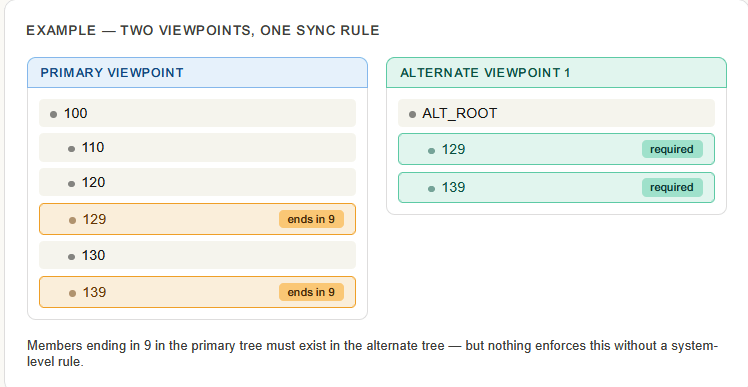
The risk: Without enforcement, users create a node in primary and move on. The alternate viewpoint gets out of sync. Downstream applications that depend on the alternate tree receive incomplete or stale metadata — often silently.
The solution — node type property as a validation trigger
EDM lets you attach a node data type property to the primary viewpoint that points to the bottom nodes of an alternate viewpoint. When the right condition is met — in this case, a member name ending in 9 — the property becomes active and blocks the request until the user has also inserted the member in the alternate viewpoint.
The result is a built-in guardrail: the request simply cannot be completed without the alternate viewpoint being updated.
How to set it up
- On the primary viewpoint, create a node data type property and configure it to point to the bottom nodes of Alternate Viewpoint 1.
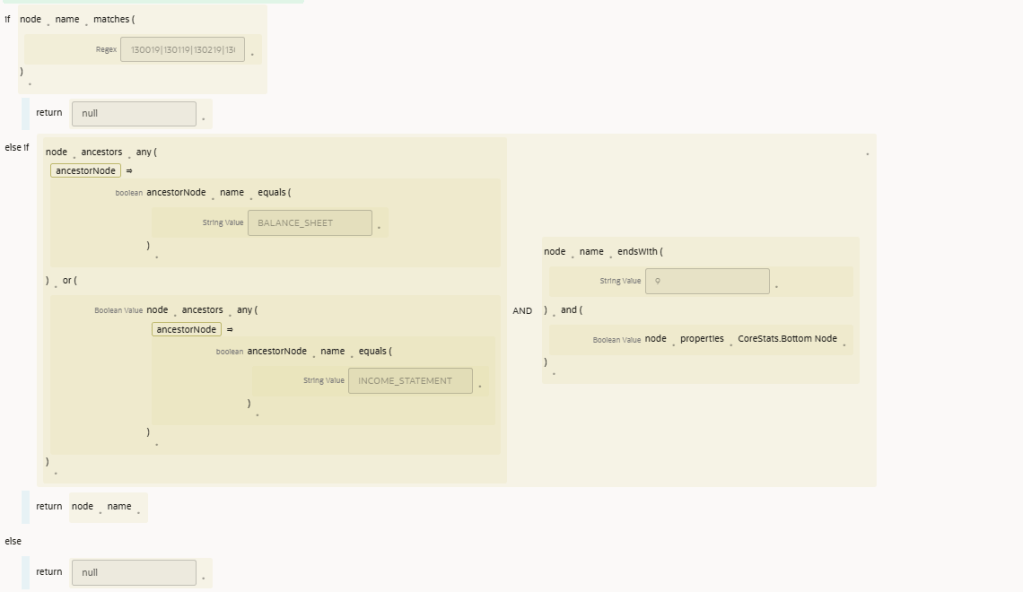
- Set up the trigger condition — in this example, the property activates when the new member name ends in
9. - When the condition is met, EDM will surface a validation error prompting the user to insert the member in the alternate viewpoint before the request can proceed.
- Once the alternate viewpoint is updated, the validation clears and the request completes normally.
Validation in action
Action required: Member 129 ends in 9 and must also be added to Alternate Viewpoint 1 before this request can be submitted.
Scaling to multiple alternate viewpoints
The same pattern repeats cleanly for every additional alternate viewpoint you need to manage. Each alternate gets its own node type property on the primary viewpoint, with its own condition and its own target.
Alternate viewpoint 1
Trigger: member name ends in 9
Target: Alternate VP 1 bottom nodes
Alternate viewpoint 2
Trigger: member starts with a specific prefix
Target: Alternate VP 2 bottom nodes
Alternate viewpoint 3
Trigger: based on classification or type
Target: Alternate VP 3 bottom nodes
Alternate viewpoint N
Trigger: any rule you define
Target: corresponding bottom nodes
Key benefit: Each alternate viewpoint is independently governed. Adding a new alternate means adding one new property to primary — the existing rules and viewpoints are untouched.
Conclusion
Alternate viewpoints only deliver value when they stay current. Relying on users to remember sync rules across multiple trees is fragile — sooner or later, something gets missed.
By attaching node type properties to the primary viewpoint and pointing them at alternate viewpoint bottom nodes, you shift the enforcement from a manual checklist to the data model itself. Users are guided at the point of action, the system ensures completeness, and your downstream applications always receive the metadata they expect.
As your dimension structure grows with more alternates and more rules, this pattern scales without complication — one property per alternate, each independently maintained.
Pattern at a glance
Mechanism
Node data type property on primary
Trigger
Condition on new member (e.g. ends in 9)
Enforcement
Validation error until alternate is updated
.
 Site Title
Leave a comment